LabFromZero Part 4 - IDP and Platform Services
Premise
After all the infrastructure and GitOps prerequistes are available, it is now time to configure the platform services. This post covers the GitOps the core services (ForgeJo, FluxCD, Zitadel, OpenBao, Headlamp, monitoring) that turn the bare cluster into a usable private cloud.
This part extends GitOps repo and the configuration of various supporting platform services.
Core platform services
Cilium and Gateway
Cilium is utilized for multiple purposes in this guide:
- Kube proxy replacement
- Gateway API controller
- CNI
The GitOps configuration installs various extra resources and configurations for a futureproof setup
- LoadBalancer IP Pool for the gateway services
- L2 Announcement that makes the LB VIP visible and reachable on the local lab network
- Gateway configuration for the main entry point for exosing services externally
- HTTPS redirect route
Identity Provider - Zitadel
A proper private cloud environment needs to have its own IDP, where users and groups are managed. A central location for authentication and authorization for the whole environment.
Zitadel provides OIDC for:
- Kubernetes API access (
kubectl oidc-login) - Headlamp
- OpenBao
- ForgeJo
- Grafana
- And any future applications
The default admin user and the default Zitadel Organization is set as helm overrides.
IaC note: All the specific OIDC application and group configrations should be captured in terraform config.
ForgeJo (git and docker repo)
Self-hosted Git that serves the GitOps repository. After the initial Helm install it is migrated under the FluxCD bootstrap repo so upgrades and configuration stay declarative. In this GitOps repository it is configured with the respective Zitadel OIDC client. Disabled registation so only federated users are allowed to log in.
ForgeJo is capable of hosting OCI packages as well. Later on we are going to use this functionality to store some custom images.
Headlamp
Kubernetes web UI, configured to use Zitadel OIDC so operators never need long-lived kubeconfig credentials on their workstations.
Observability
- Prometheus (metrics)
- Grafana (dashboards)
This is pretty much standard configuraition with kube-prometheus-stack
Related Flux / Helm Configuration
OpenBao
OpenBao with the YubiHSM unseal configuration requires a bit more preparation. An earlier post explains some technicalities around this topic.
The interaction with the YubiHSM requres some specific PKCS#11 implementation libraries. These libs are required to be accessible in the image. The containerfile contains all the required installations..
This containerfile is then pushed into the forgejo package registry that should already be running fine in this lab environment:
git.labfromzero.internal/LabFromZero/openbao-ubi-yubihsm:2.7.0
This custom image needs to be overridden for the helm deployment with other specific details regarding the YubiHSM integration.
IaC note: All the specific OIDC authentication groups, policies and roles are set up via terraform application that should be the foundation for any day-2 maintenance.
Kubernetes OIDC Auth
Operators should not use the Kubernetes admin.conf to access the cluster via kubeclt. Since it support ODIC auth the cluster can be configured to check the authorization of the users via OIDC.
The configuration is 2-fold. Both the apiserver and the operator clients need certain changes
OIDC Kubernetes API Server
The api server needs to have the respective OIDC config, so the following changes on all control nodes are required:
# /etc/kubernetes/manifests/kube-apiserver.yaml
...
- --oidc-issuer-url=https://idp.labfromzero.internal
- --oidc-client-id=39**********83 # k8s-LabFromZero app clientID
- --oidc-username-claim=email
- --oidc-groups-claim=groups
- --oidc-ca-file=/etc/ssl/certs/ca-certificates.crt # trusted CAs on debian / ubuntu in this case certmanager intermediate CA is trusted by the host
...
Kubectl Config
The local operator's kubectl OIDC configuration is in the ~/kube/config.yaml file. This way the auth flow goes through the Zitadel IDP seamlessly.
# ~/.kube/config
apiVersion: v1
clusters:
- cluster:
    certificate-authority-data: LS0tLS1CRUdJTiBDRVJUSUZJQ0FURS0tLS0tCk1JSUs******************************************************************************************************************************************************************************************************************************************************************************************************************************************************************************************************************************************************************************************************************************************************************************************************************************************************************************************************************************************************************************************************************************************************************************************************************************************************************************************************************************************************************************************************************************************************************************************************************************************************************************************************************************************************************************************************************************************************************************************************tLS0tRU5EIENFUlRJRklDQVRFLS0tLS0K
    server: https://control001.labfromzero.internal:6443
  name: LabFromZero
contexts:
- context:
    cluster: LabFromZero
    user: oidc
  name: LabFromZero
current-context: LabFromZero
kind: Config
users:
- name: oidc
  user:
    exec:
      apiVersion: client.authentication.k8s.io/v1
      args:
      - oidc-login
      - get-token
      - --oidc-issuer-url=https://idp.labfromzero.internal
      - --oidc-client-id=39**********83
      - --oidc-extra-scope=openid
      - --oidc-extra-scope=email
      - --oidc-extra-scope=profile
      - --oidc-extra-scope=offline_access
      command: kubectl
      env: null
      interactiveMode: IfAvailable
      provideClusterInfo: false
Security posture of the platform services layer
- All service certificates come from the private PKI via the intermediate CA (cert-manager)
- Authentication flows through Zitadel - no local accounts where avoidable
- Secrets live in OpenBao - the unseal key never leaves the HSM
- Break-glass credentials remain only in the offline password manager
- Network policies and Gateway API routes limit exposure to the lab subnet
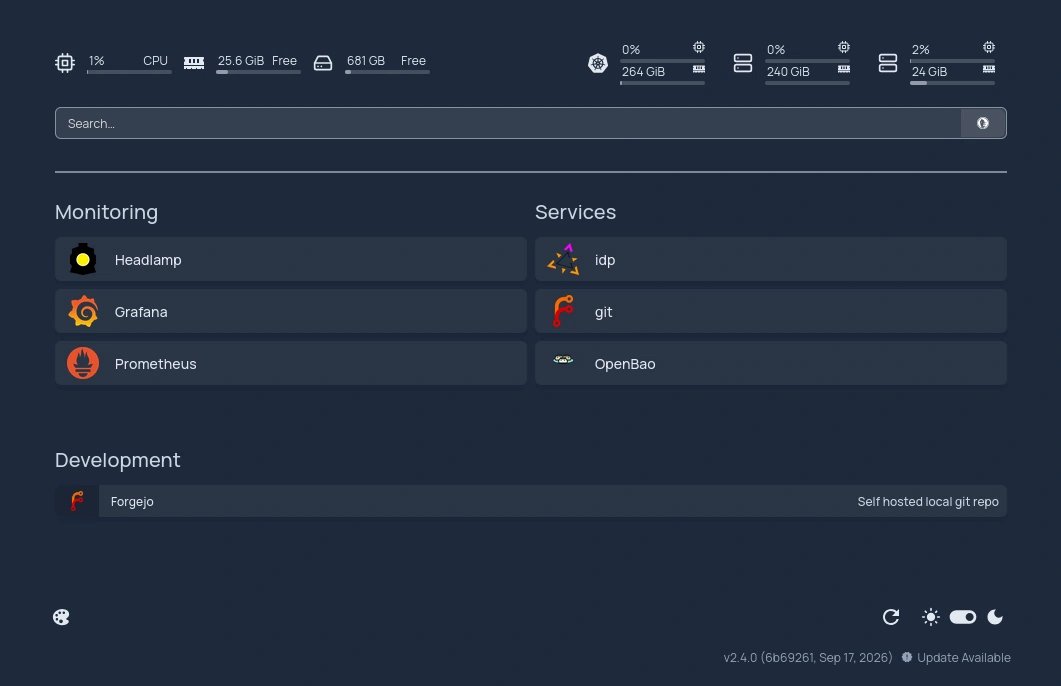
Internal Link Manager - Homepage
A proper link catalog is often missing for most platform teams. Homepage elegantly solves this problem for this internal lab environment: